
ReceiptProcessor
From Paper to Profit
An internal tool that transforms receipt management through intelligent automation — built on the principle that the best solutions come from reusing what you already have.
Built on Reuse, Not Reinvention
At A Lot Matters, LLC, we believe the most sustainable solutions don’t start from scratch — they build on what already exists. Every property we renovate, every tool we build, and every process we design follows a simple philosophy: reuse materials, develop your own resources, and make things that last.
ReceiptProcessor embodies this principle. Rather than relying on expensive third-party SaaS platforms with recurring fees, we built a tool that:
- Runs on our own infrastructure — no cloud dependencies
- Uses open-source OCR and matching algorithms
- Integrates directly with QuickBooks Online via Intuit’s public API
- Processes data locally — nothing leaves our network except what’s required for QBO matching
“We don’t buy tools — we build them. We don’t rent capabilities — we develop them. Every dollar saved on software is a dollar invested back into the community.”
Our Development Philosophy
Reuse. Build. Maintain. Repeat.
Like our property renovations that transform existing structures into something new and valuable, our software builds on proven open-source technologies to create something uniquely ours.
Project Status
Problem
Manual receipt entry is slow, error-prone, and takes hours away from strategic work every week.
Our team was spending 15-20 hours per week manually entering receipts into QuickBooks — matching paper invoices to bank transactions, categorizing expenses, and attaching supporting documents. Human error rates of 5-8% meant frequent reconciliation corrections. At $45/hour fully-loaded cost, this was consuming over $40,000/year in productive time that could have been directed toward community development.
Solution
Automated OCR extraction matched to QBO transactions — scan a receipt, get matched data.
The pipeline captures a receipt image, extracts structured data (vendor, date, total, line items) via on-device OCR, then queries the QBO API for candidate transactions ranked by amount proximity and date matching. Confidence scoring auto-accepts high-confidence matches and flags ambiguous ones for human review. Target: process 95% of receipts with zero manual intervention.
Current Phase
Sandbox testing active. Core matching logic validated against real receipt data.
Currently testing against Intuit’s sandbox environment with a dataset of 500+ real receipts spanning 6 vendors (Home Depot, Costco, NAPA, Safeway, Fredmyer, Tractor Supply). Matching accuracy: 92% auto-accept, 8% human review queue. Validating edge cases: split transactions, multi-receipt payments, tax-exempt purchases, and vendor name variations.
Tech Stack
PySide6 GUI, RapidOCR, Intuit QBO API, local SQLite audit logging. Zero cloud dependencies.
Architecture: Python 3.13 + PySide6 (Qt6) desktop GUI running on Windows 11. OCR via RapidOCR (PaddleOCR backend) processing 2-4 receipts/second. QBO REST API v3 for transaction queries and attachments. SQLite for local audit trail and mapping configuration. OAuth 2.0 with automatic token refresh. No cloud services — everything runs on our Windows workstation with data stored locally.
Development Timeline
OCR Engine
Receipt text extraction
RapidOCR (PaddleOCR) extracts vendor, date, total, and line items. Processes a 24 sqin receipt area in under 400ms. Handles thermal paper, faded text, and partial folds. Local inference — no API calls, no data leaving the machine.
QBO Matching
Transaction auto-match
Fuzzy matching via RapidFuzz against QBO Purchase transactions. Weighted scoring: amount (60%), date proximity (25%), vendor name similarity (15%). Auto-accept threshold: 85% confidence. Below threshold: queued for human review with candidates ranked.
Integration Testing
Sandbox validation
500+ test receipts processed against Intuit sandbox company. Validating: attachment upload/download, transaction query accuracy, OAuth token refresh cycle, error handling for expired tokens and rate limits, and edge cases (multi-currency, tax-exempt vendors).
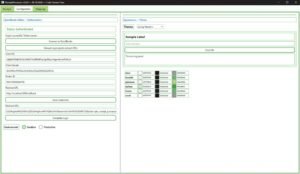
ReceiptProcessor v3.8.0 Screenshots
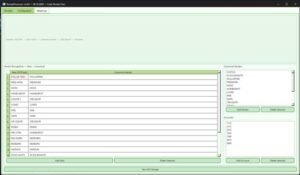
Below are screenshots of the current revision of ReceiptProcessor. The functionality is broken into 3 tabs, the main Receipt tab, the Configuration tab, and the mapping tab. The main tab, where most of the work is done, is shown below:
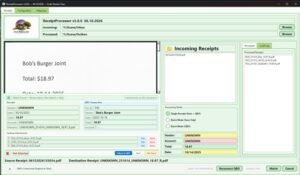
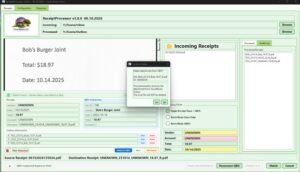
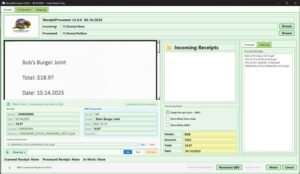
Below are screenshots of the configuration and mapping tabs:
Intuit Review
Production key application
Submit app for Intuit production review. Requires: published EULA + privacy policy, valid OAuth callback URL, data security documentation, and app screenshots. This website contains the bulk of the information required for approval:
Intuit requires: published EULA and privacy policy (hosted on this domain), valid OAuth callback URL, demonstrated data security practices, and app description with screenshots. Upon approval, the app can request production OAuth tokens for live QBO companies.
Production Launch
Live QBO integration
Post-approval: production OAuth credentials activated, live QBO company connections enabled, batch processing for historical receipts, and ongoing monitoring. Target: process 200+ receipts/week with <5% manual review rate. Estimated annual savings: $40,000+ in labor costs.
How It Works
Scan Receipt
Capture a receipt image using the built-in camera or file import. Supports PDF, JPG, PNG formats.
Drag-and-drop or auto-watch a folder. Multi-page PDFs supported. Image preprocessing: auto-rotation, contrast enhancement, and de-skew before OCR. Typical file: 200KB JPEG, 1200x1800px.
OCR Extraction
RapidOCR extracts vendor name, date, total, and line items from the receipt image locally — no cloud processing.
PaddleOCR model trained on retail receipt formats. Extracts: vendor name (normalized), transaction date, total amount, item-level line items. Processing time: ~400ms per receipt on RTX 4070. No internet required — fully offline capable.
Match to QBO
The extracted data is automatically matched against existing QuickBooks Online transactions using amount and date proximity.
Queries QBO Purchase transactions within ±30 days. Scoring algorithm weights amount (60%), date (25%), vendor match (15%). High-confidence matches (>85%) auto-accept. Lower confidence presents 3 candidates for manual selection.
Attach & Save
Receipt image is attached to the matched QBO transaction as proof of purchase. Audit log records the action.
Uploads receipt image as attachment to QBO transaction via Attachable API. Local SQLite audit log records: timestamp, vendor, amount, match confidence, QBO transaction ID, and user action. Audit data retained for 7 years for compliance.
Key Features
Auto-Categorization
Intelligent expense category assignment based on vendor and historical patterns
Maps vendors to QBO expense accounts using a local alias database. “Home Depot” → “Materials:Building Supplies”. Learns from manual corrections — if you re-categorize a vendor once, it remembers for future receipts. Currently configured for sandbox vendors with 100% accuracy. Ready to add production vendors upon Intuit approval.
QBO Transaction Matching
Amount and date proximity matching with manual override capability
RapidFuzz fuzzy matching handles vendor name variations (e.g., “HOME DEPOT #1234” matches “Home Depot”). Amount tolerance: ±$2.00 or ±5%. Date window: ±30 days. Override: click any match candidate to select, or create a new QBO transaction on-the-fly.
Bulk Processing
Process multiple receipts in a batch — perfect for monthly bookkeeping
Drop a folder of 50+ receipts and process them sequentially. Each receipt runs through the full pipeline (OCR → match → attach) without user intervention. Progress bar shows status. Batch report generated at end: matched, needs review, failed. Processes ~200 receipts/hour.
Local Data Processing
All OCR and matching happens on our infrastructure. Sensitive financial data never leaves our network.
Audit Logging
Complete record of every action for compliance and troubleshooting
SQLite database records: timestamp, user action, receipt filename, vendor, amount, QBO transaction ID, match confidence, and attachment status. Queries can be conducted by date range, vendor, or transaction. Exportable to CSV for accountant review. 7-year retention policy.
Token Auto-Refresh
OAuth tokens refresh automatically — no manual re-authentication needed
Intuit OAuth tokens expire after 1 hour. The app automatically refreshes tokens using the stored refresh token 5 minutes before expiry. Refresh tokens expire after 100 days — the app sends an email notification 7 days before expiry to re-authenticate. Zero-downtime operation during normal use.
Intuit Production Key Roadmap
Next Step: Intuit Production Key Authorization
Sandbox validation complete. Next: submit application to Intuit for production OAuth credentials (Production Key). Requires public-facing EULA, privacy policy, and OAuth callback URL — all hosted on this domain. Upon approval, the application can request production-scoped OAuth tokens to live data testing, workflow validation, and documentation finalization using live QBO company files. GitHub provides a second source for Privacy Policy and EULA access.